
Greek TV & Radio supports compatible Android TVs and Android TV boxes. You install the app on the television itself. This is different from casting playback from a phone.
Before you start
You need an Android TV or compatible TV box, access to Google Play and an internet connection. A television being a “Smart TV” does not necessarily mean it runs Android. Check its operating system in Settings or the manufacturer’s documentation.
Find the official app
Google Play determines installation availability for your particular device and account. The official listing includes Android TV support; this does not guarantee compatibility with every model.
- Open Google Play on your television or TV box.
- Search for “Greek TV Live & Radio Player” and check that the developer is Nick Stampoulis.
- Choose Install if it is available for your device. Open the app when installation finishes.
- Use the directional buttons and centre button on the remote to select an available channel.
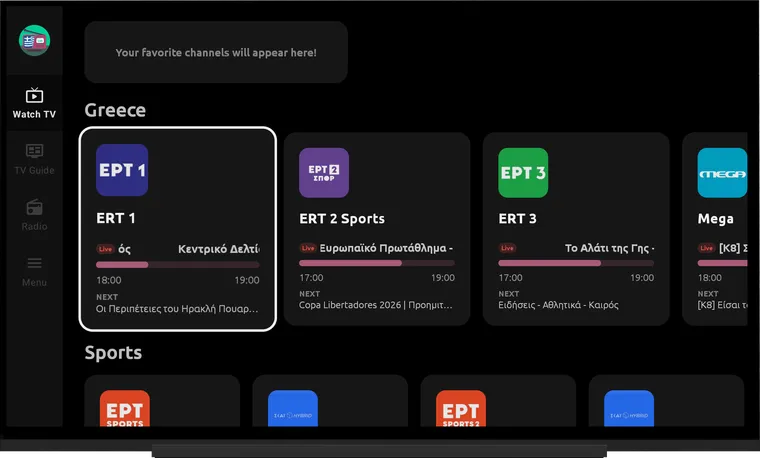
If the app does not appear
Open the official Google Play listing linked from this page and check your available devices. If your television is unsupported, do not assume a similarly named app is the same product. Consider casting to a compatible receiver or browser access through GreekTV Live.
What to expect from broadcasts
Providers control their available sources and restrictions. A channel may work in Greece but be unavailable in another country. Installing the app on a television does not change these restrictions.
Remote controls and support
Menu names and layouts vary by television and software version. If you cannot select an item or start playback, contact support with the device model, Android version and the step where you get stuck. Never include passwords or account credentials.
Download for Android · Contact
Sources & availability
Capabilities are based on the official app listing. Steps and menu names may differ by version and device. Google Play
Screenshots show version 2.1.6, confirmed by the developer.
Content checked:
App screenshots · not a live broadcast