
If you live or travel outside Greece, you can try the available Greek TV & Radio broadcasts on your device. Access to each channel depends on its source and your country; not every broadcast is available everywhere.
Choose how to watch
Use the official app on a compatible Android phone or tablet. On a Windows PC, Mac or another device with a browser, open GreekTV Live using the link on this page. Browser viewing does not require a Windows app installation.
Check a channel before relying on it
Try the channel from the country and connection where you plan to watch. Installing the app successfully does not guarantee access to every broadcast.
- Open the official app or GreekTV Live in your browser.
- Select the channel you want and allow playback to start.
- If it does not play, try a second channel and check your internet connection.
- Check the channel’s official website for availability of a particular programme.
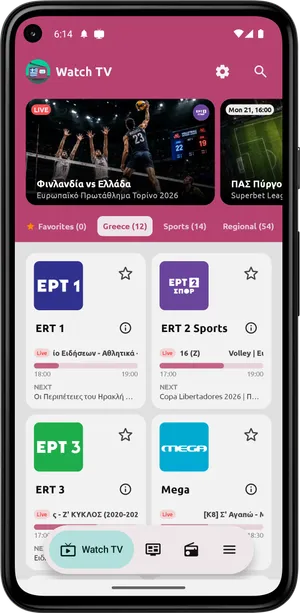
Why a programme may be unavailable
A provider may restrict a broadcast by country or temporarily interrupt its source. Availability may vary by programme and time. Reinstalling the app, casting or using Android TV does not change the source’s restrictions.
Watch on a television
You can install the app directly on a compatible Android TV. Alternatively, try casting to a compatible receiver after confirming the same broadcast plays on your phone. Hotel guest Wi-Fi may prevent devices from communicating with one another.
If you need help
Tell support your country, channel name, the time of the problem and whether you use Android, a browser or casting. These details help distinguish a source issue from a device issue.
Download for Android · Contact
Sources & availability
Capabilities are based on the official app listing. Steps and menu names may differ by version and device. Google Play
Screenshots show version 2.1.6, confirmed by the developer.
Content checked:
App screenshots · not a live broadcast