
Greek TV & Radio brings television and radio broadcasts into the Android app. To listen to radio, open the station list and choose the programme or music you want to hear.
Start listening
You need a compatible Android device and internet access. Radio is streamed over the internet, so listening uses mobile data when you are not on Wi-Fi.
- Install Greek TV Live & Radio Player from the official Nick Stampoulis listing on Google Play.
- Open the app and choose the radio section.
- Select an available station from the list.
- Check the media volume on your phone and any connected audio device.
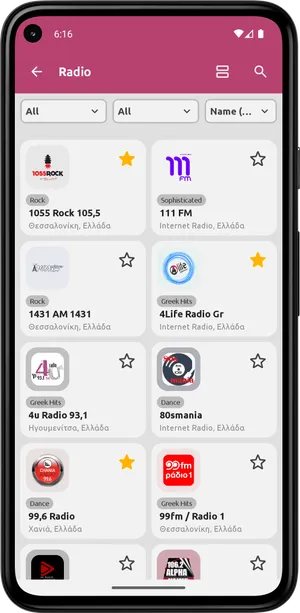
Keep stations you listen to often
Use favourites to find your stations again without searching the entire list. Control names and positions may vary by app version.
Headphones and Bluetooth audio
If headphones or a Bluetooth speaker are connected, audio may play there instead of on your phone. Check the selected audio output and volume on both devices. To test, temporarily disconnect Bluetooth and listen through the phone speaker.
A station will not play or keeps stopping?
Try a second station. If it works, the first source may have an interruption or availability restriction. If no stations play, check your internet connection and try again on stable Wi-Fi. The app cannot guarantee continuous availability of external broadcasts.
Listening outside Greece
Access depends on the source and your location. If a station is unavailable, check its official website. To report a problem, send support the station name, country, app version and device model.
Download for Android · Contact
Sources & availability
Capabilities are based on the official app listing. Steps and menu names may differ by version and device. Google Play
Screenshots show version 2.1.6, confirmed by the developer.
Content checked:
App screenshots · not a live broadcast